Zevi, by Opsyfy

Your OPD, without the crowd at the front desk.

Zevi is the appointment and queue system built for Indian clinics. Patients book from your clinic's link and hear from you on WhatsApp. Reception runs the whole day's queue from one Android phone. The doctor calls the next patient with one tap.

No app for patientsA link and WhatsApp
Any Android phoneOr a front-desk tablet
3 languagesEnglish, हिंदी, मराठी
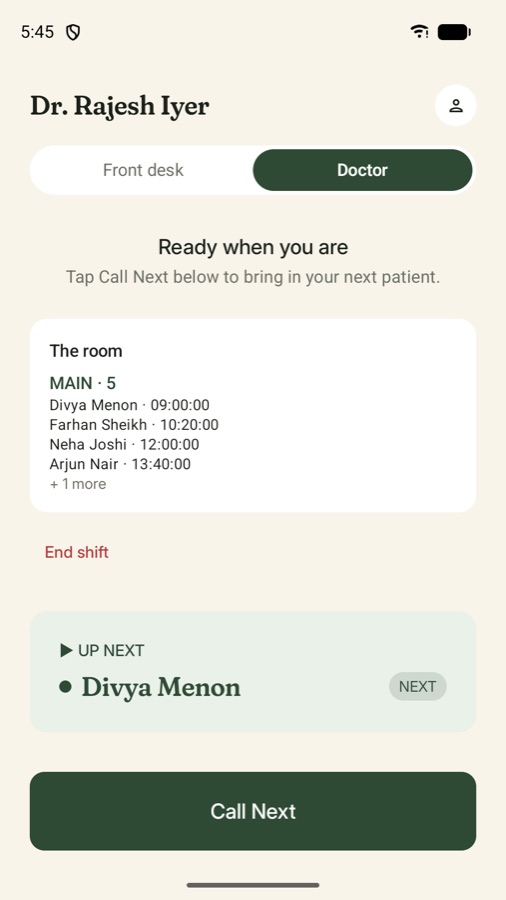
Zevi doctor screen: the patients in the room, who is up next, and a Call Next button
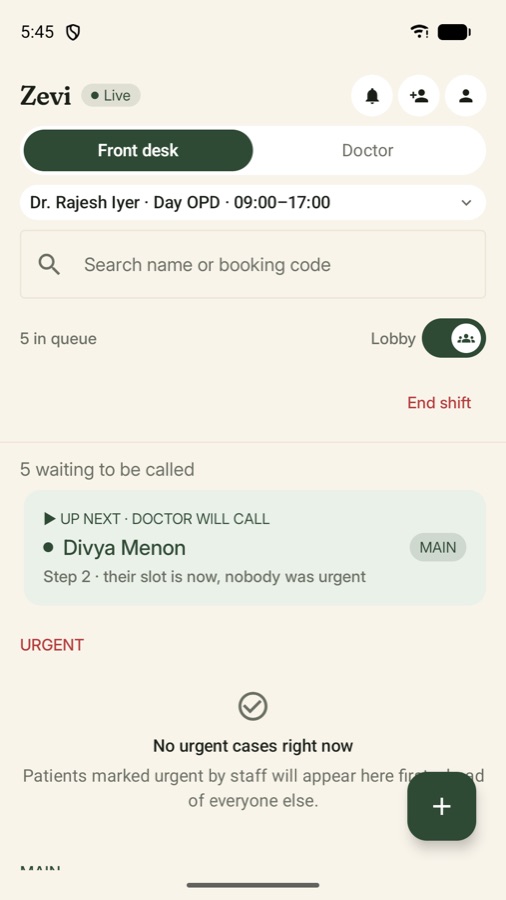
Zevi front desk screen: the live queue for Dr. Rajesh Iyer's Day OPD with the next patient and urgent cases
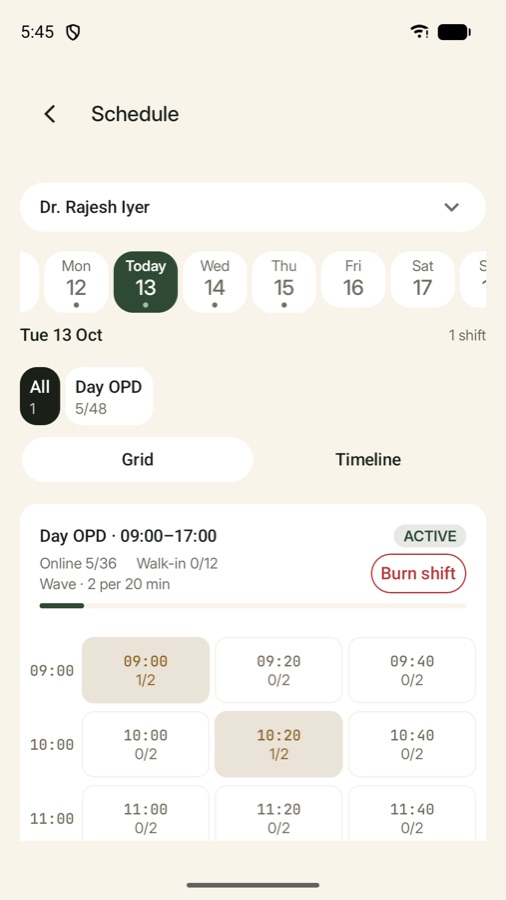
Real screens from the Zevi app (demo clinic)

Why we built Zevi

Most OPDs still run on a register, a loud voice, and patients asking “kitna time lagega?”

01

The waiting room is the queue.

Nobody can tell patients when they'll be seen, so they come early and wait. The room fills up, tempers rise, and reception spends the morning answering the same question.

02

Walk-ins and bookings collide.

A walk-in at 10:05 pushes back the patient who booked 10:00. Patients learn that a booked slot means nothing, so they stop booking.

03

The doctor waits too.

Between patients, someone is calling a name down the corridor, or waiting for a patient who stepped out. Minutes lost, many times a day.

How it works

One Tuesday OPD, with Zevi.

A single doctor's morning, from the patient booking the night before to the doctor being called away. Every step is something Zevi does today.

  1. Patient

    A slot is booked from a link, not a phone call.

    Ramesh opens the clinic's booking link, picks Dr. Iyer and 10:20 tomorrow, and books for his mother from his own WhatsApp number. The confirmation arrives on WhatsApp.

  2. Front desk

    Reception starts the shift.

    Today's bookings are already in the queue, in order. Nothing to copy from a register.

  3. Front desk

    A walk-in is added in seconds.

    Name and WhatsApp number. Zevi puts her on Standby, so she fills the next open gap instead of pushing back people who booked. A daily walk-in limit keeps booked slots safe.

  4. Patient

    “Your turn is coming up.”

    Ramesh is told the turn is near and replies that they're ten minutes late. Reception sees the answer next to the name.

  5. Doctor

    One tap: Call Next.

    Zevi decides who goes in: urgent cases first, then the patient whose slot it is, then someone from Standby to fill a gap. Nobody has to argue about it.

  6. Front desk

    Reception knows if the patient got the alert.

    The screen shows whether the “your turn” alert reached the patient's phone. If it didn't, it says so plainly: call the name.

  7. Zevi

    A no-show doesn't stop the room.

    The patient moves to Standby and gets another chance, and the next person goes in. Miss the turn twice and they're off the day's list. The doctor isn't left waiting.

  8. Doctor

    An emergency, handled in one step.

    The doctor is called away. The rest of the shift is cancelled in one step, and every patient booked in it gets a WhatsApp message, instead of a waiting room full of people finding out at 3 PM.

One app, three jobs

Built for the people who actually run the OPD.

The front desk, the doctor and the clinic owner each get their own view in the same Android app. Everyone sees the same queue, live.

Front desk queue screen
Front desk

The whole day, on one screen.

  • Every doctor's live queue, with who's next
  • Add a walk-in with a name and a number
  • Mark a patient urgent and they go first
  • Find anyone by name or booking code
  • A notification when the queue changes
Doctor screen with Call Next
Doctor

Call the next patient. That's it.

  • See who's waiting and who's next
  • Call Next with one tap, no shouting
  • Start and end your own shift
  • Morning and evening OPDs kept separate
Schedule screen with slots for the day
Clinic owner

Set it up once. See every slot.

  • Doctors, shifts and slot timings
  • Each day's bookings, slot by slot
  • Choose how patients get their messages
  • An activity log of every change

For patients

Your patients don't download anything.

Every clinic gets its own booking link. Share it on WhatsApp, print it at the desk, put it on Google Maps.

  1. Pick the doctorFrom your clinic's own page, on any phone.
  2. Pick a timeOnly slots that are really free are shown.
  3. Confirm on WhatsAppNo password. One WhatsApp number can book for the whole family.
  4. DoneChange or cancel later from the same link.
Booking confirmedRescheduledCancelledTurn coming upMissed your turn
An example. Booking page and messages work in English, Hindi and Marathi.

Made for India

Built for how Indian clinics really work.

Not a hospital system cut down to size. Zevi starts from the small and mid-sized OPD: one desk, a few doctors, a lot of walk-ins.

Walk-ins are normal.

They're part of the day, not an exception. Standby and a daily walk-in limit let them in without breaking the booked queue.

Two OPDs a day.

Morning and evening shifts run as separate queues, so the evening never inherits the morning's mess.

Ordinary phones.

Runs on any Android 10 or newer phone or tablet. No computer, no hardware, no token machine.

The clinic's languages.

The staff app and the booking page both work in English, Hindi and Marathi.

WhatsApp, not another app.

Patients already use it. Confirmations, changes and turn alerts reach them where they already are.

Your data stays yours.

Encrypted in transit, a PIN or fingerprint on every staff phone, never sold and never used for ads.

About Opsyfy

We build the software Indian clinics run on.

Opsyfy is an Indian software company. Our first product is Zevi, because the queue is where every clinic struggles in the same way, every single day.

We build alongside the clinics that use Zevi. We sit at their front desks, watch a real OPD, and fix what we see. That's why Zevi has Standby, a walk-in limit and the “call the name” warning: each one came from a real morning at a real clinic.

Company
Opsyfy
Product
Zevi: Android app and patient booking page
Udyam (MSME)
UDYAM-JH-01-0066436
D-U-N-S®
Registered with Dun & Bradstreet
Based in
Pune, Maharashtra, India
Write to us
hello@opsyfy.in
Registered MSME, Government of IndiaUdyam UDYAM-JH-01-0066436 · Verify on udyamregistration.gov.in ↗
D-U-N-S® registered businessVerified by Dun & Bradstreet through the national registry

Prithvee Pandey

Founder & CEO

Leads product and the company. Spends his time between the code and the clinics that use it.

LinkedIn ↗

Safeera Sufyan

CMO, Clinic Partnerships & Sales

Works with clinic owners and doctors from the first conversation to the day their OPD goes live.

LinkedIn ↗

Shubham Pandey

Technical Advisor

Shapes the architecture behind Zevi, so the queue stays fast and reliable as more clinics join.

LinkedIn ↗

Get started

Bring Zevi to your clinic.

Tell us how your OPD runs today. It takes about three minutes.

  1. 01
    We reply within 24 hoursOn WhatsApp, from a real person on our team.
  2. 02
    A short call about your OPDYour doctors, shifts, walk-ins, and what hurts most.
  3. 03
    We set it up with youDoctors, slot timings, staff logins and your booking link, ready before your first day.

Rather talk first? Message us on WhatsApp or email sales@opsyfy.in.

Questions

What clinics ask us first.

Do my patients need to download an app?

No. Patients book from your clinic's link in any phone browser and get their messages on WhatsApp. Only your staff use the Zevi app.

What does my front desk need?

Any Android phone or tablet running Android 10 or newer, and an internet connection. No computer, printer or token machine.

We get a lot of walk-ins. Will Zevi work for us?

Yes, that's what it's built for. Walk-ins go on Standby and fill gaps between booked patients. You choose how many walk-ins a shift can take, so booked patients keep their slots.

Which clinics is Zevi for?

Outpatient clinics with one or more doctors: general physicians, paediatrics, dental, dermatology, eye, ENT and multi-speciality OPDs. If patients wait to see a doctor, Zevi helps.

How much does it cost?

It depends on how many doctors you have and whether you want every patient message on WhatsApp. We share clear pricing on the first call, before you commit to anything.

Is our clinic's data safe?

Data is encrypted in transit, staff phones are locked with a PIN or fingerprint, and only your clinic's staff can see your clinic's data. We never sell it or use it for ads. Read our privacy policy.

Can we stop, and have our data deleted?

Yes. Write to us and we'll delete your clinic's data within 28 days. See how to delete your data.

zevi

Make tomorrow's OPD a calmer one.

Get Zevi for your clinic
WhatsApp us